

Employee Scheduling
Why Office Scheduling is the Essence of a Hybrid Workplace
Key Takeaways
Limitation on Number of On-premise Staff Health safety compliance does not allow offices to function on full strength. This is one of the primary reasons for businesses to opt for a hybrid workplace . Employee visits are scheduled in advance or on an as-required basis. At the same time, offices cannot exceed the number of employees specified by the authorities. So, if one extra person comes in, they need to move one out.
Deciding Which Teams or Employees Need to be On-premise On a given day, multiple teams would want to use the office for a variety of reasons. Some may need it for a weekly huddle, others for client meetings or resolving a critical issue. As a workplace manager, it is not possible to deprioritize or dismiss a requirement completely. Therefore, you will have to manage office space utilization such that there are no scheduling conflicts. You can manage your employees’ workdays, allocate desks, resources, and meeting rooms with office scheduling software.
Time and Resources Required to Manage Office Scheduling Managing schedules through a spreadsheet would be difficult for organizations with a large workforce. To accommodate a single change, you may have to coordinate with all people who plan to visit the office at a given hour or time of the week. The larger the workforce, the more time and resources the process takes. It could also lead to chaos, and eventually, non-compliance with health safety regulations.
Meeting Room Booking Working with office scheduling software, the option to book meeting rooms helps teams plan their visits. You can also integrate it with Google and Outlook Calendar for added convenience.
Visitor Management Software For several businesses, offices serve as a place for client meetings. An office scheduling software equipped with a visitor management system can prioritize such purposes over others. It helps ensure that the business does not lose out on revenue-generating opportunities.
Most sectors have bid goodbye to the traditional 9-to-5 workweeks. With restrictions on the number of people allowed on-premise, hybrid workplaces are now becoming the norm. A critical component of the hybrid workplace is office scheduling employee visits and work hours. It helps teams synchronize better for both on-premise and remote work. Consequently, office scheduling software space is bubbling with new options and features.
While there is much noise around what an employee scheduling software can or cannot do, one must understand its importance in a hybrid setup.
Why is Office Scheduling Required in a Hybrid Workplace?
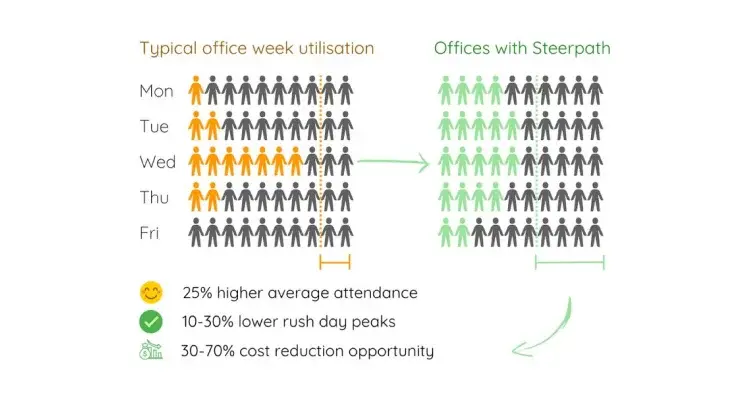
A hybrid workspace thrives on enabling synchronization within and between teams. The changes due to COVID have placed new demands on it, making workforce scheduling more critical. You can broadly group these under four reasons:
1. Limitation on Number of On-premise Staff
Health safety compliance does not allow offices to function on full strength. This is one of the primary reasons for businesses to opt for a hybrid workplace. Employee visits are scheduled in advance or on an as-required basis. At the same time, offices cannot exceed the number of employees specified by the authorities. So, if one extra person comes in, they need to move one out.
2. Deciding Which Teams or Employees Need to be On-premise
On a given day, multiple teams would want to use the office for a variety of reasons. Some may need it for a weekly huddle, others for client meetings or resolving a critical issue. As a workplace manager, it is not possible to deprioritize or dismiss a requirement completely. Therefore, you will have to manage office space utilization such that there are no scheduling conflicts. You can manage your employees’ workdays, allocate desks, resources, and meeting rooms with office scheduling software.
3. Time and Resources Required to Manage Office Scheduling
Managing schedules through a spreadsheet would be difficult for organizations with a large workforce. To accommodate a single change, you may have to coordinate with all people who plan to visit the office at a given hour or time of the week. The larger the workforce, the more time and resources the process takes. It could also lead to chaos, and eventually, non-compliance with health safety regulations.
4. Supports Employee Needs and Provides Adequate Flexibility
Many surveys indicate that employees prefer the flexibility of choice in terms of work location and timings. Hence, space scheduling software needs to fulfill this need also.
Let’s look at the possible types of office schedules that are possible.
Different Approaches to Office Scheduling
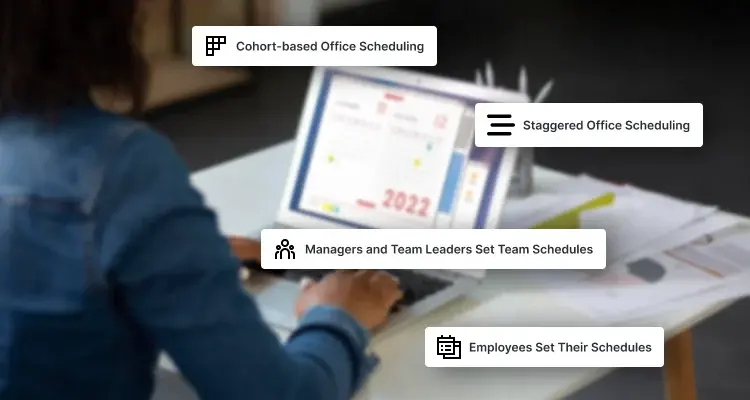
Based on business and employee needs, workplace managers will have to choose a different approach to office scheduling. Following are a few popular ones:
1. Cohort-based Office Scheduling
With arguments for three-day work-from-office gathering steam, cohort-based office scheduling is likely the most popular approach. Here, employees are required to visit the office on fixed days and hours of the day. Some teams may choose to meet three specific days a week, while others might have a lower or higher frequency depending on their work needs.
Predictability is the most significant advantage of cohort-based office scheduling. Workplace managers would precisely know how many people would be present on a floor on any given day. It’s also easy to manage.
Cohort-based scheduling’s downside is lack of flexibility. For projects involving multi-team collaboration, you have to change the entire roster and accommodate other requests too. It can be too much to handle from an operational perspective.
2. Staggered Office Scheduling
The primary purpose of staggered office scheduling is to limit the number of people on the floor at any given hour. In this approach, employees have specific entry and exit times. While it works well for the most part, problems emerge when employees cannot adhere to the specified time. If employees overstay because of the work demand, the number of people on a floor may exceed the permitted number.
With careful planning and adequate cushioning to handle deviations, staggered office scheduling works well for most companies. Using supporting technology like access management and occupancy detectors helps workplace managers drive compliance.
Both cohort-based and staggered office scheduling approaches are predictable but less flexible than custom schedules discussed below.
3. Managers and Team Leaders Set Team Schedules
Allowing managers to set schedules for their respective teams provides them greater flexibility. It lets them bring the team together when they deem fit.
At large enterprises, using a technology solution helps keep the number of on-premise employees in check.
The degree of flexibility in this approach is immense. However, it could become an administrative liability when managers do not find time to do it in a planned manner.
4. Employees Set Their Schedules
Letting employees decide their schedules fulfills employees’ need for flexibility. Of course, an employee needs to be aligned with the team and be present when the situation demands. That said, the onus of scheduling a visit and booking space still lies with the employee.
What Tools does Office Scheduling Software Offer for a Hybrid Workplace?
An office scheduling software could be a standalone schedule booking application or work in sync with other components of a hybrid workplace. The latter automates workplace operations and takes away significant manual workload. Following are a few features to look for in space scheduling software:
1. Team Planner
Office scheduling involves planning employee visits to the office. Without a team planner, managing them will be a challenge.
Team planner provides you information on employee’s availability and locations. So, you can manage their work schedule and office visits. It helps you plan and implement multiple employee rotation strategies without a hitch.
2. Attendance Management
Attendance management forms the core of office scheduling software. It lets you monitor and manage employee sign-in and sign-out times. An intelligent system would help you get real-time insights on work hours, absences, and employee commute.
3. Centralized Dashboard
With a centralized dashboard, you can track employee locations on-premise, sign-in/ sign-out times, desk and meeting room reservations, and more. Given the pandemic, it also lets you track compliance with safety protocols. It also helps you keep a tab on employee activity to drive better productivity.
4. Desk Booking
It enables your employees to book their desks with ease and view where their colleagues are seated. It allows teams to collaborate better by letting them book desks at specified locations. Desk booking can also help people adhere to social distancing guidelines by limiting bookings.
5. Meeting Room Booking
Working with office scheduling software, the option to book meeting rooms helps teams plan their visits. You can also integrate it with Google and Outlook Calendar for added convenience.
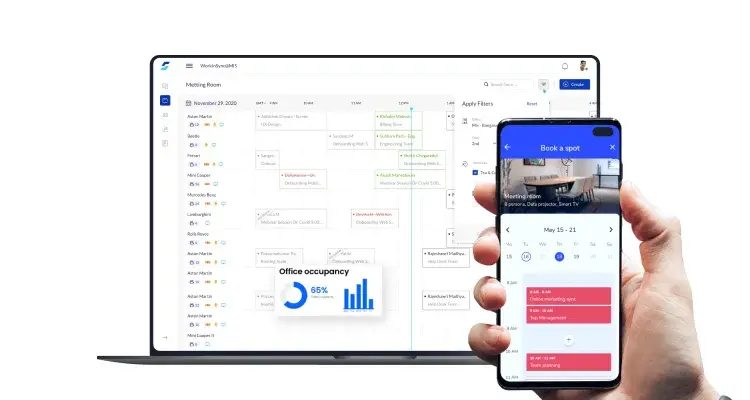
6. Visitor Management Software
For several businesses, offices serve as a place for client meetings. An office scheduling software equipped with a visitor management system can prioritize such purposes over others. It helps ensure that the business does not lose out on revenue-generating opportunities.
7. Unified Audit Reports
Unified Audit Report at regular intervals can provide you insights into office space bookings. It helps you make informed decisions, better utilize space, and comply with health and safety regulations.
With these features, your office scheduling software can drive efficiency. It can also provide employees a seamless hybrid workplace experience.
Conclusion
A hybrid workplace isn’t possible without an office scheduling system. While using a spreadsheet could work for an office with a handful of employees, it isn’t best suited for even slightly larger organizations. Not investing in office scheduling software is, therefore, not an option.
Workforce scheduling software varies with the vendor. And each vendor you come across will have a different understanding of your industry. Choosing a vendor who provides you with a complete suite of office scheduling solutions will help you avoid integration challenges at a later stage.
WorkinSync specializes in office scheduling software and has helped more than 135 organizations across industries to date. With almost 100% uptime, you also enjoy the peace of mind of working with a 27001 ISO Security Certified software provider.
Reach out to us to know how we can enable your hybrid workspace with the most effective office scheduling software.
Subscribe to our blogs for more information on office scheduling.








Download Our App



 MoveInSync 2026, All rights reserved