
 Workplace Management
24 September 2026
Best Workplace Management Software in 2026: 6 Tools Compared
Compare six workplace management platforms. See what each is suited for and how to choose the right fit in 2026.

Deesha
|
4 Min Read
Read More

Key Takeaways
Office space utilization tracks how efficiently your workplace is used, helping cut costs and improve comfort.
Metrics like occupancy rate, desk usage, and peak hours reveal underused or overcrowded spaces for better planning.
Good utilization boosts employee wellness with flexible layouts, quiet zones, and better collaboration spaces.
Smart layouts and hybrid setups help workplaces stay adaptable as employee needs and work patterns evolve.
Real-time data from sensors and booking tools ensures optimized desk and meeting room usage.
Challenges include inaccurate space data, tech limitations, employee preferences, and budget constraints.
Best practices: install occupancy sensors, use data to redesign layouts, review usage regularly, and encourage feedback.
WorkInSync enables data-driven space decisions with sensor insights, flexible bookings, and scalable space management tools.
Office space utilization refers to how effectively your physical workspace is being used. It involves measuring various factors like occupancy rates and the usage of desks and meeting rooms.
You can optimize office space by analyzing data on employee movement and preferences. This helps identify areas that are underutilized or overcrowded.
Key metrics to consider include:
Occupancy Rate: The percentage of occupied spaces versus total capacity.
Peak Utilization: Times when space is most used.
Desk Utilization: Analyzing how frequently desks are occupied.
By focusing on these factors, you can enhance workspace utilization. This process promotes both employee productivity and comfort.
Effective office space utilization can lead to cost savings by reducing wasted space. Implementing smart office solutions can provide valuable insights into workspace dynamics.
Moreover, exploring workspace utilization enables you to adapt to hybrid work models. This flexibility can improve employee experience and enhance overall corporate efficiency.
Incorporating these strategies will ensure that your office space meets the evolving needs of your organization. By actively managing and optimizing your workspace, you foster a productive environment for all employees.

Enhanced Workplace Experience: Effective office space utilization is crucial for enhancing the workplace experience. It aligns with employee preferences, leading to higher satisfaction and engagement. When space is optimized, employees feel valued, which boosts morale.
Employee Wellness: Utilizing space efficiently impacts employee wellness. Thoughtful layouts can include areas for relaxation and collaboration, fostering a healthy work environment. By incorporating employee surveys, you can understand their needs and behaviors, ensuring that the workspace supports productivity.
Sustainability: Sustainability is another critical aspect. Efficient space management reduces waste and energy consumption, contributing to corporate responsibility. Companies that prioritize sustainable practices often attract top talent, aligning with the values of today’s workforce.
Workplace Adaptability: Workplace dynamics change rapidly, especially with the rise of hybrid work. You need to adapt your space to accommodate these shifts. Flexible layouts and smart office solutions can help manage fluctuating occupancy while maximizing efficiency.
Corporate Real Estate Efficiency: Lastly, consider the impact on corporate real estate efficiency. By measuring office utilization metrics, you can make informed decisions that cut costs while enhancing the employee experience. This strategic approach positions your organization as a modern and responsive workplace leader.

Calculating office space utilization involves assessing how effectively your office space is being used. This process can help you optimize your office layout and improve overall efficiency.
1. Determine Total Office Space
Start by measuring the total square footage of your office. This includes all areas such as desks, meeting rooms, and common spaces.
2. Assess Occupancy Levels
Count the number of employees who are present during peak hours. You can use a simple formula:
Occupancy Rate = (Number of Employees / Total Workstations) x 100.
3. Analyze Room Usage
Track the usage of meeting rooms. Record how often rooms are booked versus their total availability. This helps identify if meeting room optimization is needed.
4. Evaluate Desk Arrangements
Consider the setup of workstations. Flexible workstations can increase utilization rates by accommodating different work styles.
5. Monitor Space Allocation
Review how spaces are allocated between departments. Ensure that high-demand areas receive the necessary resources.
6. Utilize Technology Tools
Leverage smart office solutions to gather real-time data on space usage. This can enhance your understanding of room usage patterns.
By following these steps, you can gain valuable insights into your office utilization. This data will inform your space planning and help create a more effective work environment.
Measuring office space utilization involves several key metrics. These metrics provide insights into how effectively you use your workspace.
1. Occupancy Data
This metric tracks the number of employees present in your office at any given time. It helps you understand peak usage times and underutilized spaces.
2. Density
Density measures the number of employees per workspace. High density may indicate effective space use, while low density may suggest inefficiencies.
3. Analytics and Reporting
Using analytics tools, you can generate reports that highlight occupancy patterns and usage trends. This data helps in making informed decisions about space planning.
4. Space Utilization Audits
Conduct regular audits to evaluate how different areas of your office are used. This can identify spaces that require redesign or reallocation.
5. Occupancy Sensors and Motion Sensors
These technologies track real-time usage of desks and meeting rooms. They provide accurate data on how often spaces are occupied.
6. Key Performance Indicators (KPIs)
Establish KPIs such as average workspace utilization rates or total occupied square footage. This quantifies your effectiveness in managing office space.
By implementing these metrics, you can enhance your space management strategies and optimize your office layout for better productivity.
1. Underutilized Areas
Many workplaces struggle with areas that remain largely unused. These spaces can lead to wasted resources and increased costs.
2. Inaccurate Space Measurement
Determining how much space is needed requires precise data. Inaccurate measurements can result in overestimating or underestimating needs.
3. Scheduling Conflicts
Managing desk and meeting room bookings can create conflicts, particularly in a hybrid work model. This can diminish employee productivity and workplace satisfaction.
4. Employee Preferences
Employees often have different preferences for workspaces. Catering to these varied needs can be complex, especially in a shared environment.
5. Technology Integration
Implementing smart office solutions requires seamless integration with existing systems. Poor technology can hinder effective monitoring and management of space.
6. Evolving Work Patterns
Work models continue to evolve, impacting space requirements. Keeping up with these changes can be challenging for space planners.
7. Budget Constraints
Finding ways to optimize space while adhering to budget limits can be difficult. Organizations must balance costs with effective space management strategies.
By addressing these challenges, you can enhance office space utilization and improve overall workplace efficiency.
To maximize space utilization in your office, consider the following best practices:
Implement Booking Systems: Use advanced booking systems for meeting rooms and collaborative spaces. This ensures efficient usage and helps avoid double bookings. Employees will appreciate the ability to reserve hot desks and meeting areas based on their needs.
Implement Occupancy Sensors: Use technology to track space usage. Occupancy sensors help understand peak usage times and adjust settings for better efficiency.
Adopt Flexible Layouts: Design spaces that can be easily reconfigured. Modular furniture allows for quick adjustments based on team needs or project requirements.
Leverage Data-Driven Design: Analyze space usage data to inform your layout. By utilizing insights from occupancy analytics, you can make informed decisions about your workspace.
Encourage Hybrid Work: Promote a mix of remote and in-office work. This can reduce the need for dedicated desks, allowing for more shared spaces.
Regularly Review Space Needs: Conduct assessments to identify underutilized areas. Facility managers should periodically evaluate office layouts to ensure alignment with current business needs.
Optimize Meeting Rooms: Ensure meeting spaces are equipped for different styles of collaboration. Provide technology solutions that streamline booking and usage.
Engage Employees in Layout Planning: Gather feedback on workspace designs. Involving employees can lead to layouts that enhance productivity and satisfaction.
Implementing these strategies can significantly enhance your office’s efficiency and improve the overall workplace experience.
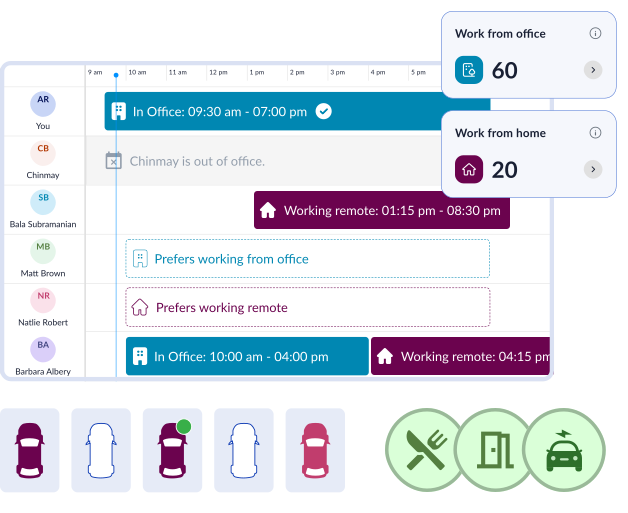
Workinsync offers comprehensive space management software to enhance your office space utilization. By leveraging advanced space optimization software, you can analyze usage patterns and occupancy data effectively.
With technology integration, Workinsync enables seamless connections between various tools. These integrations ensure that all aspects of your office space management are aligned.
Reservation systems provided by Workinsync allow your team to book desks and meeting rooms easily. This fosters a more organized approach to office usage, reducing wasted space and improving workflow.
Scalability is another key benefit. As your organization grows, Workinsync can adapt to your changing needs without requiring extensive overhauls.
Finally, by utilizing office utilization insights, you gain critical data to inform your strategic decisions. This empowers you to continuously refine and improve your space management strategies.
 Workplace Management
24 September 2026
Compare six workplace management platforms. See what each is suited for and how to choose the right fit in 2026.
Deesha
|
4 Min Read
Read More
 Announcement
13 August 2026
WorkInSync has been recognized by Info-Tech Research Group as a Champion in the 2026 Data Quadrant for Space Management, ranking #2, and as a Champion in the Emotional Footprint, ranking #2. Both awards are published on SoftwareReviews, Info-Tech's ratings platform, where rankings are built entirely from user feedback.

Sai Riddi
|
2 Min Read
Read More
 Desk Booking Software
5 June 2026
Let’s not pretend otherwise. Somewhere in your organization, a well-meaning IT or facilities team rolled out a desk booking system. There was a demo. Someone said “seamless.” There may have been a slide with the word “frictionless” on it. Leadership nodded. Procurement signed off. And then employees quietly went back to texting each other on […]

Ujjwal Trivedi
|
6 Min Read
Read More