
 Workplace Management
24 September 2026
Best Workplace Management Software in 2026: 6 Tools Compared
Compare six workplace management platforms. See what each is suited for and how to choose the right fit in 2026.

Deesha
|
4 Min Read
Read More

Key Takeaways
8 in 10 companies rate visitor management systems as essential, especially for compliance and workplace safety.
A modern VMS does more than log names, it’s your lobby’s first line of defense against risks and inefficiencies.
Pre-registration saves time, controls crowds, and supports safer, contactless entry for all types of visitors.
Occupancy management helps avoid overcrowding through invite-based access and real-time visitor caps.
Health screening tools, like thermal checks or pre-visit health forms, screen risks even before visitors arrive.
With contact tracing, facilities teams can isolate exposure zones and people if a visitor tests positive later.
Customizable forms tailor data collection to visit types, ensuring relevant info, whether it’s a courier or client.
Seamless third-party integrations provide Wi-Fi access or remote collaboration options without last-minute scrambles.
A user-friendly interface minimizes confusion and reduces dependency on front-desk staff.
Advanced reports reveal trends from long vendor meetings to employee disengagement for better workplace planning.
Ensure your VMS is privacy-compliant, with granular control over what data is stored, accessed, and deleted.
In a 2019 survey, 8 out of 10 organizations said that a visitor management system is extremely important. Over 38% of companies stated compliance as the main reason for getting a visitor management system. Furthermore, 92% of these companies agreed that a visitor management system contributes to creating a safer environment.
With offices reopening, it is not just your employees who will be returning. Visitors will start dropping in as well. So, you’ll need a visitor management system that can track employee and visitor sign-ins. Even if you previously had one, considering the changes induced by the pandemic, you may want to upgrade it.
If you are out in the market to choose a visitor management system, here’s a must-read for you. We list nine features that you cannot afford to miss.
If you think a visitor management software only collects your contact information before letting you in, then know that’s just one part of the process. A visitor management software does more – it tracks the usage of a building and its facilities. It keeps unwelcome and unwanted visitors at bay. Placed in the reception, it also serves as the first touchpoint for all visitors. The ideal system ensures that they have a seamless and good experience. And think of it, your lobby is the first line of defense against all kinds of threats – both COVID and non-COVID.
With hybrid workplaces becoming the norm, visitor management software becomes even more necessary. Equipped with the right features, it functions as an essential component of people management. Let’s explore these in greater detail.
Paper-based visitor management systems are now obsolete. They help you do little else than build an irretrievable database of people. If you still use it, chuck it right away. If you have been using a seemingly sophisticated screen-based system, which again builds just a database, it may not be as helpful in a post-pandemic world.
Here are nine features that you need if you want visitor management to serve its purpose.
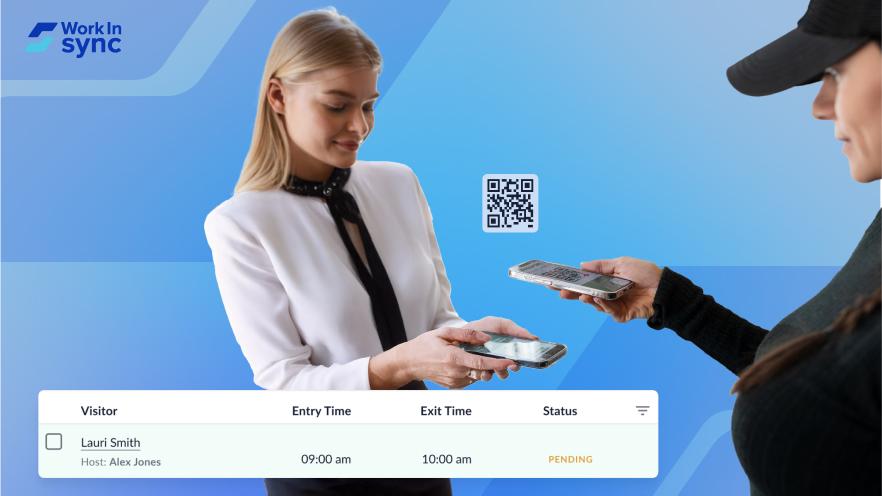
1. Pre-registering visitors – While this feature helped reduce queues at the reception earlier, it serves a more fundamental purpose now. It saves users time and reduces the risk of infection while waiting in line. It can also help reschedule visits based on occupancy levels at a given hour.
2. Occupancy management – Any visitor management system you choose must ensure that several visitors does not exceed the cap set by regulatory authorities. You can do it by adopting an ‘invite first’ approach, allowing only vetted visitors. The system can alert the concerned team or even block new registrations to prevent overcrowding.
3. Health screening – A crucial aspect of visitor management is to prevent the spread of infection. Integrated with thermal scanners or other contactless temperature detection systems, a modern VMS can deny entry to certain visitors. Alternatively, by enabling pre-registering, you can send health questionnaires to visitors. The system can allow or deny permission based on visitor responses.
4. Contact tracing – On receiving confirmation of a visitor contracting infection later, the facility managers need to act fast. To prevent infection spread, they need to track down and isolate people in proximity to the visitor. Additionally, they would also have to cordon off and disinfect spaces occupied by visitors for a considerable duration. A modern VMS tracks a visitor’s on-site activities, helping the facilities team to act more swiftly.
5. Customized forms – If you’ve been making a courier or food delivery person fill the same form as a business vendor, then you’ve been hurting the efficiencies of two businesses – your own and that of the courier. The ability to customize a form based on the purpose of the visit can help you collect necessary and meaningful information. Make sure the visitor management system has this feature.
6. Third-party integration – Working in a hybrid work environment, the visitor might need to share or present information with remote workers. The visitor management system must enable such interaction by providing the visitor required level of access to your office infrastructure. At the very least, you would not want to run around at the last minute to get Wi-Fi access for a business visitor.
7. User-friendly interface – If every second visitor needs assistance or has questions when filling out a form, it defies the purpose of an automated system. So, look for software with an intuitive interface that reduces the need for manual intervention.
8. Advanced reporting capabilities – Investing in collecting visitor details serves little purpose if you cannot retrieve them and draw meaningful insights. For example, knowing if your vendor meetings are stretching too long or the wait time of certain visitors exceeds their meeting time, you can make necessary interventions for better efficiency.
On the other hand, employee sign-in patterns could provide early signals of disengagement. It would enable the human resources team to diagnose and act on the underlying issues. Given the various purposes, a VMS must generate customized reports and automatically distribute them to the relevant stakeholders.
9. Compliance with data and privacy regulations – An important but often overlooked aspect of visitor management is data privacy. Visitor databases of businesses are warehouses of rich information – not just individual information but also about plans and business strategies. Therefore, a modern VMS must be compliant with data residency and deletion policies at multiple levels. It must allow the client organizations to choose the data they intend to capture, store, and duration to retain it.
Regardless of the type of business, the breadth of expectations of a visitor management software has increased. It serves as a critical tool that prevents health risks, improves efficiency, and ensures regulatory compliance. So, when you are out shopping for one, remember that the old checklist of features is no longer applicable.
While the above list is admittedly not exhaustive, it will help set you on the right path for finding the visitor management system that’s best for your business in a changing world.
Subscribe to our blog and stay updated with the latest developments in hybrid workplaces.
 Workplace Management
24 September 2026
Compare six workplace management platforms. See what each is suited for and how to choose the right fit in 2026.
Deesha
|
4 Min Read
Read More
 Announcement
13 August 2026
WorkInSync has been recognized by Info-Tech Research Group as a Champion in the 2026 Data Quadrant for Space Management, ranking #2, and as a Champion in the Emotional Footprint, ranking #2. Both awards are published on SoftwareReviews, Info-Tech's ratings platform, where rankings are built entirely from user feedback.

Sai Riddi
|
2 Min Read
Read More
 Desk Booking Software
5 June 2026
Let’s not pretend otherwise. Somewhere in your organization, a well-meaning IT or facilities team rolled out a desk booking system. There was a demo. Someone said “seamless.” There may have been a slide with the word “frictionless” on it. Leadership nodded. Procurement signed off. And then employees quietly went back to texting each other on […]
Ujjwal Trivedi
|
6 Min Read
Read More