

Meeting Room Management
Meeting Room Booking Solution: Understanding Pros & Cons
Key Takeaways
Meeting room booking struggles include double bookings, extended use, and unused reservations, wasting time and space.
A booking system automates scheduling, occupancy tracking, and allocation, improving efficiency for all stakeholders.
Real-time occupancy data helps optimize space, reduce rent and energy costs, and repurpose underused rooms.
Self-service booking via apps or panels democratizes access, boosts morale, and reduces manager dependency.
Integrated service booking ensures AV, cleaning, and support teams are aligned for every meeting.
Automatic detection of no-shows and rescheduling updates keeps room availability accurate without manual intervention.
Costs of purchase, integration, and training can be significant, especially for budget-tight organizations.
Employee adaptation may take time, requiring phased rollouts and continuous training.
Narrow-function tools may need supplementing with other software unless opting for an all-in-one platform.
A meeting room booking solution has become a necessity for hybrid organizations. This blog explores the pros and the cons, ultimately helping you come to the right decision.
Introduction
A survey revealed that employees spend up to 30 minutes a day booking a meeting room. Hence, a meeting room booking system.
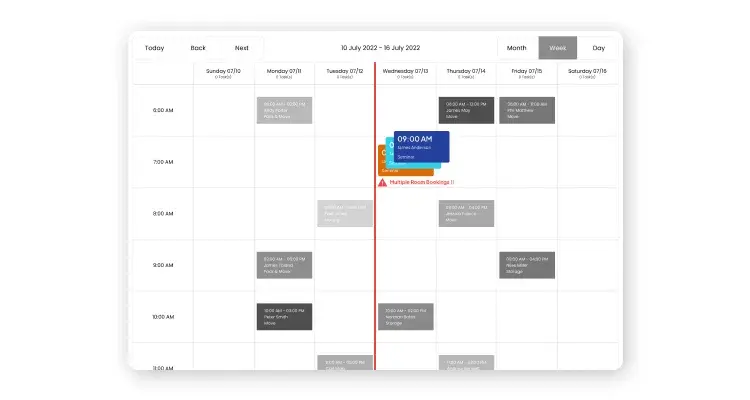
Now, this is not a current-day problem. Companies have been struggling with scheduling meetings ever since office workflows included frequent meetings.
Here are the common obstacles with meeting room booking.
Multiple rooms booked for the same meeting
Canceled meetings are not terminated immediately from attendees’ calendars
Booking for a room is extended due to late start
Conference rooms are occupied even without booking
Therefore, the need for meeting room booking systems.
Also Read: What is a Meeting Room Booking Solution?
The software can automate the conference room scheduling process, collect room booking data, and automatically allocate meeting rooms based on occupancy and availability.
While the efficiency of the conference room booking process increases, as a result, all stakeholders can save time.
So, it is no wonder that many companies have already included them in their workflows. According to a survey, by 2019, roughly 31% of companies will have a meeting room booking system in place.
But we need to understand both the benefits and the pitfalls of getting a meeting room booking solution.
Benefits of Installing a Meeting Room Booking System
1. A Meeting Room Booking Solution Helps You Cut Real Estate Costs
We already know that using a meeting room booking system makes the room booking process more efficient. But are meeting rooms being utilized to the fullest in the first place?
On average, we utilize an office meeting room only 29% of the time. In terms of money, it means companies are shelling out a sizable amount on rent and energy bills for an underutilized asset.
A meeting room booking system gives facility managers real-time data about room occupancy and usage at any time. This means they can understand the demand for meeting rooms during the day and week.
Meanwhile, this occupancy data can be crucial in optimizing the space. In a hybrid work model, these insights show the actual footfall.
For instance, facility managers can convert unused meeting spaces into hot desks with such data. Therefore, a meeting room booking system cuts unnecessary costs and helps manage the available space better.
Bonus Read: 5 Effective Tips for Meeting Room Management
2. It Democratizes the Room Booking Process

Often employees have to wait to get a confirmation for available meeting rooms. They have to wait for their manager’s approval. This results in a tedious process.
A meeting room booking system allows employees to find and book a meeting room on-demand using a mobile app. Additionally, these apps reduce the workload of facility managers.
A meeting room booking system allows reservations using multiple methods. This includes web-based booking, app-based booking, room-mounted display panel-based reservations, etc.
By syncing their data to the cloud, these methods facilitate a quick and fuss-free meeting room booking system, no matter the place.
Moreover, by democratizing room reservations, organizations can boost employee morale and reduce bias. Furthermore, it fosters a better working environment.
3. A Meeting Room Booking Solution Promotes Cross-Service Coordination
A glitch-free meeting requires staff to manage audio-visuals, computers, and conference units, along with room reservations. With a meeting room booking system, employees no longer have to book these services separately.
The software provides a single interface for choosing these services as well.
It also allows staff to access meeting room data easily. Additionally, they can plan their work around meeting room timings. For instance, the cleaning staff is notified immediately after a meeting ends. This will allow them to sanitize the room after a session rapidly.
4. It Handles Changes in Meeting Schedule and Cancellations Automatically
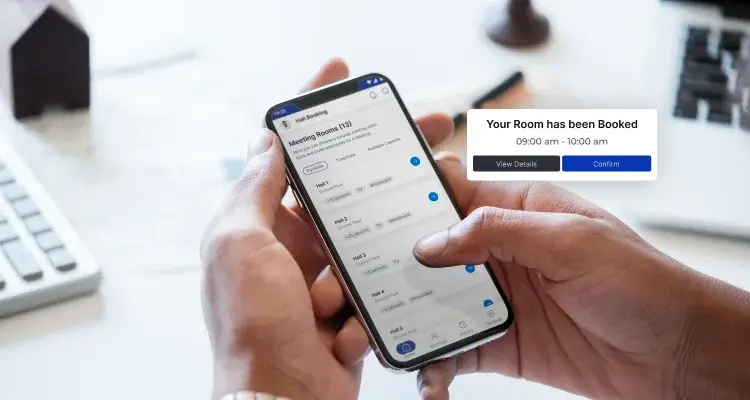
Updating meeting schedules and cancellations is a process many employees avoid since it is time-consuming and convoluted. A meeting room booking system can automatically detect empty meeting rooms in real-time.
The software detects meeting room no-shows by scanning for empty meeting rooms that remain unoccupied after a preset time-out. Further, they automatically mark these rooms as unavailable on the database.
Additionally, in case of a meeting rescheduling, a meeting room booking solution automatically notifies the concerned employees about the schedule change. This is automatic, quick, and convenient and reduces the manual burden of facility managers who usually manage these processes to a large extent.
Pitfalls of Installing a Meeting Room Booking System
1. Deploying a Meeting Room Booking Solution is an Investment
The cost of deploying new software, including buying, installation, product integration, and employee training costs, all add up over time. If an organization has a tight budget, getting an expensive meeting room booking system may not be best.
However, solutions like WorkInSync provide basic meeting room management features for organizations at a budget.
Also Read: Why is a Meeting Room Booking Software Essential
2. Employees May Take Long to Adapt to the Meeting Room Booking Solution
Despite conducting timely training sessions with employees, they might not be able to use them efficiently in one go. Adapting a new software takes time.
This is why most companies roll them out in stages over an extended time frame.
3. The Need to Install Different Apps to Manage Different Aspects of Work
Installing a meeting room booking system may make meeting room management easier. However, the software’s function is often just that. This means IT managers might need to install different software to manage other aspects of work.
For instance, they might need desk booking software to manage office space. This requires additional monetary investment as well as additional training for employees.
That’s why it’s crucial to choose a meeting room booking solution that accommodates numerous features with a simplified interface.
To Conclude
Whether or not a company plans to install a meeting room booking system depends on the benefits and pitfalls. It is necessary to understand both before adopting a new system.
Given the wide range of features WorkInSync packs, the software is sure to make meeting room bookings a smooth experience. Regardless of the budget or company size.
Moreover, WorkInSync’s meeting room booking system comes equipped with office scheduling, desk management, contact tracing, access management, and many other features. All of this ultimately renders it a one-stop solution.
Subscribe to our blog to know more about the latest developments in meeting room booking solutions.











Download Our App



 MoveInSync 2026, All rights reserved