
 Workplace Management
24 September 2026
Best Workplace Management Software in 2026: 6 Tools Compared
Compare six workplace management platforms. See what each is suited for and how to choose the right fit in 2026.

Deesha
|
4 Min Read
Read More

Key Takeaways
Dashboards in 2026 move from static reports to real-time, continuously updating operational views.
Unified visibility across workplace and commute data enables faster, cross-functional decision-making in one place.
AI assistants allow natural-language queries, instant reports, and proactive issue detection without manual analysis.
Predictive intelligence helps forecast demand, prevent capacity issues, and optimize space and staffing in advance.
Role-based dashboards ensure each user sees only relevant data, improving clarity and reducing decision fatigue.
Modern systems like WorkInSync combine real-time data, AI, and unified visibility to enable proactive workplace management.
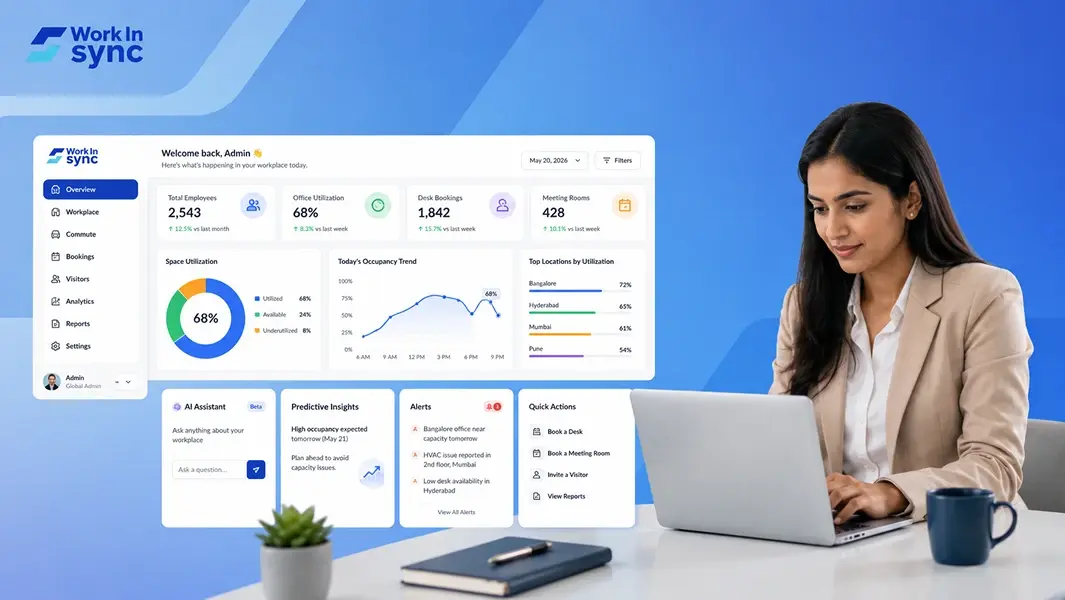
As a Facility Manager, you need a dashboard that gives you real-time, role-tailored insight and pushes only the actions that matter so you can make smarter workplace decisions. The best dashboards move beyond static charts to cover surface occupancy, costs, commute impact, and predictive risks in a single view tailored to your role.
A workplace management dashboard in 2026 should combine unified visibility across facilities and commutes with AI-driven predictions and suggestions. It should also offer simple role-based controls so you spot issues, assign actions, and measure outcomes without digging through silos. This blog will give you in-depth insights about what a modern workplace management dashboard should look like in 2026.
You should no longer rely on static snapshots that only tell you what happened yesterday. Dashboards in 2026 should stream live signals from desks bookings, meeting room bookings, sensors, and employee commutes to show current conditions and near-term trends.
Data should update continuously, so you can see occupancy, desk availability, and meeting-room booking status in real time. This ensures teams can make quick decisions, avoid conflicts, and use available space more effectively.
Platforms like WorkInSync already follow this approach by using event-driven data pipelines that unify workplace signals into a single, continuously updating view. This ensures decisions are based on what is happening right now, not delayed snapshots.
Embed predictive AI that recommends next steps. For instance:
Suggest shifting a hybrid team’s schedule to reduce peak congestion.
Recommend reallocating desks when projected occupancy exceeds capacity.
Propose route adjustments if commute delays affect onsite staffing.
Your dashboard should act as an operational copilot, showing current state, predicting short-term outcomes, and recommending clear actions you can take immediately. The upcoming sections cover this in more detail.
You need visibility across both workplace management operations and employee commute to make better day-to-day decisions. Having a solution that supports both gives teams a more complete understanding of demand, gaps, and day-to-day operations.
Suggested dashboard elements:
Overview cards: occupancy, commute delays, active incidents
Map: real-time data of facilities and locations of shuttles
Timeline: bookings vs. actual presence for chosen period
Action pane: suggested actions and one-click automations
This layout reduces tool fragmentation and speeds cross-team decisions by surfacing the right data where you work.
MoveInSync and WorkInSync integrate into a single platform to bring all of this data together in one place, giving teams a complete view of both workplace usage and employee movement.
Your dashboard should include a built-in AI assistant that responds to natural-language queries. Ask for metrics, generate a report, or get a quick summary of yesterday’s performance without building queries manually.
AI-driven predictions surface near-term demand patterns and likely peak usage windows. These forecasts use historical trends and real-time signals, giving you lead time to reallocate resources or adjust schedules.
Use the assistant to create on-demand views: a one-click occupancy forecast to know when you would run out of desks and other resources based on how fast your team is growing.
Key benefits at a glance:
Faster report generation and ad-hoc analysis.
Proactive issue detection with recommended fixes.
Actionable forecasts for space, and asset planning.
Platforms like WorkInSync already apply these capabilities in practice. For example, forecasting models can predict when workspace demand is likely to exceed available desks, helping teams plan ahead instead of reacting last minute. AI-driven recommendations suggest the most suitable meeting rooms based on attendee count, past booking behavior, and usage patterns, making everyday decisions faster and more efficient.
The dashboard should adapt to the role of the person using it. Not everyone needs the same level of detail, and showing everything to everyone only creates clutter and slows things down.
Instead, each role should see a tailored view with only the most relevant data points and actions. For example, a workplace manager may need visibility into occupancy, bookings, and space usage, while leadership may focus on overall office space utilization trends and performance metrics. Keeping these views distinct makes the dashboard easier to navigate and more intuitive to use.
This kind of structured visibility keeps information focused, reduces noise, and helps teams act on what matters without distraction.
WorkInSync supports role-based access control, enabling organizations to define what each user can see and access, so every team works with the right level of visibility.
You should prioritize clarity and actionability when looking for a workplace management system and dashboard. Show only what matters to each role, and make high-value actions accessible in one or two clicks.
You should be able to customize and build dashboards that combine real-time operational signals with historical context.
Leverage personalization and AI to surface the right insights.
Ensure accessibility and performance so your dashboard remains useful across devices and conditions.
If you’re evaluating what this looks like in practice, it’s worth exploring WorkInSync. It brings together real-time visibility, predictive intelligence, and unified workplace data into a single platform, helping teams move from reactive management to proactive decision-making.
 Workplace Management
24 September 2026
Compare six workplace management platforms. See what each is suited for and how to choose the right fit in 2026.
Deesha
|
4 Min Read
Read More
 Announcement
13 August 2026
WorkInSync has been recognized by Info-Tech Research Group as a Champion in the 2026 Data Quadrant for Space Management, ranking #2, and as a Champion in the Emotional Footprint, ranking #2. Both awards are published on SoftwareReviews, Info-Tech's ratings platform, where rankings are built entirely from user feedback.
Sai Riddi
|
2 Min Read
Read More
 Desk Booking Software
5 June 2026
Let’s not pretend otherwise. Somewhere in your organization, a well-meaning IT or facilities team rolled out a desk booking system. There was a demo. Someone said “seamless.” There may have been a slide with the word “frictionless” on it. Leadership nodded. Procurement signed off. And then employees quietly went back to texting each other on […]

Ujjwal Trivedi
|
6 Min Read
Read More