
 Workplace Management
24 September 2026
Best Workplace Management Software in 2026: 6 Tools Compared
Compare six workplace management platforms. See what each is suited for and how to choose the right fit in 2026.

Deesha
|
4 Min Read
Read More


Key Takeaways
Meeting rooms remain essential in hybrid workplaces, with over 50% of employees citing them as a key reason for returning to the office.
Common challenges include no-shows, overcrowding, and maintaining sanitization protocols without disrupting workflows.
No-shows waste valuable space and distort utilization data, preventing other teams from booking suitable rooms.
Overcrowding in small rooms now poses safety risks, making capacity-based booking crucial for compliance with distancing norms.
Sanitization lapses can impact health and safety, highlighting the need for automated cleaning workflows post-meetings.
An interactive meeting room management software enables easy booking, modifications, cancellations, and automatic release of unused rooms.
Key features include real-time usage analytics, touchless booking and check-in, and capacity-specific scheduling.
Additional capabilities include booking amenities alongside the room and recommending rooms based on meeting type or purpose.
In the era of hybrid workplaces, where teams are scattered across different locations, the call for focus areas in the office is essential. You know, a place within the office, which promotes safe gatherings. A place where your employees can gather around, discuss ideas, connect with stakeholders, and hash out details. Now, a few experts will debate that meeting rooms are officially dead (given the pandemic), yet meeting rooms hold a particular purpose in today’s workplaces. In a recent Gensler survey, over 50% of respondents said both scheduled and impromptu meetings, along with socializing, are the main reasons for returning to the office. It is, therefore, your responsibility to make it happen. And all of this gives way for robust meeting room management software.
Now, you must understand that an interactive meeting room solution should host several features to make meeting room bookings and at large management an easy task for your employees.
In this blog, we have highlighted a few features that every meeting room management software should have.
Of the many challenges in a hybrid work environment, one of the most common complaints is scheduling a meeting room. Ironically, meetings are almost always used to bridge employees and clients, regardless of their location. So, there is no doubt that meeting rooms are still in demand. Yet, there are challenges of maintaining and scheduling meeting rooms in a hybrid workplace.
Potentially the number one challenge is the mess around booking and abandoning meeting rooms. Employees book a slot, and however, the meeting gets canceled. This results in no-shows. So, where is the challenge? Other meetings could have made efficient use of the room but didn’t get the opportunity to use it. They might end up using a space that is either too big or small for their needs.
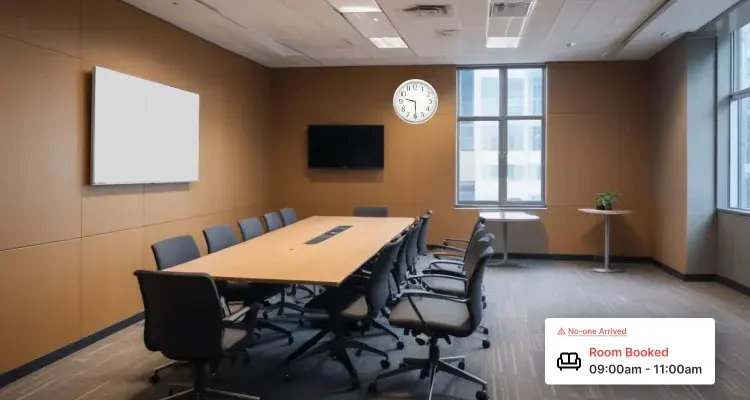
Additionally, the floor utilization numbers can be skewed and cause significant confusion when preventing overcrowding or even optimizing the office space.
In the age of social distancing, scheduling a meeting room that is too small is a major concern. Earlier, overcrowding meant no seats for latecomers. Now, it might promote the transmission of the virus within the office. Therefore, maintaining social distancing protocols for meeting rooms is essential. This becomes easier when a meeting room management software limits the capacity.
The heavily implemented sanitization flow would have been quite annoying in the pre-COVID world. However, lapses in cleaning etiquette today can have significant consequences. Enhanced cleaning protocols levied in the meeting rooms are thus necessary to ensure the safety of your employees. Though, without software, yes, it can be a massive challenge.
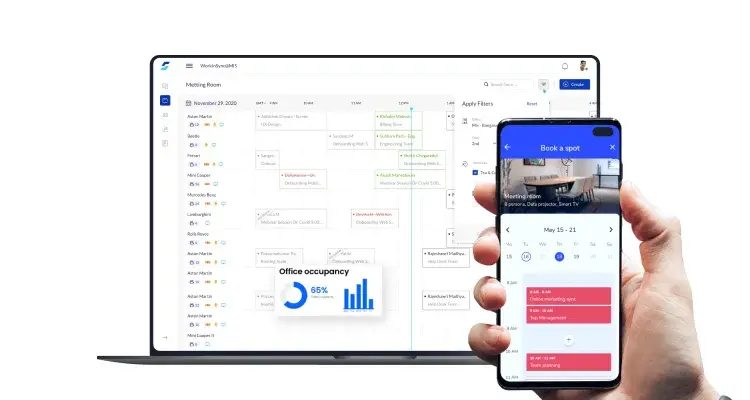
We now know that managing a meeting room in a hybrid workplace is quite a task. However, with an interactive meeting room management software, many of these frictions can be removed.
So, here is how a meeting room solution work:
In the event of a meeting, a team leader or a manager, or even an employee can log into their hybrid workspace management app and check the availability of all the meeting rooms based on date, time, room capacity, or availability of amenities (for instance, a projector)
Based on the availability, they can book the room and invite guests
At go time, they can check-in to the meeting room. If they fail to check-in, the booking can be canceled automatically and made available for those who need it
In case the meeting is rescheduled, they can change the date and time based on future availability
Once the session is over, one can initiate a sanitization workflow to ensure a clean room for others to use
An automated meeting room management software makes scheduling, modifying, canceling, and overall usage of meeting rooms convenient.
When researching your needs for a meeting room booking software, it helps to know about the stand-out features. These can make your meeting room manager even more effective. Here are the top five features you should look for when considering a meeting room management software.

The best meeting room solution will make real-time usage reports available at your fingertips. You know, details like which meeting rooms are accessible for collaboration or abandoned meeting rooms. This will help you track your office space and make more informed decisions. When armed with comprehensive workspace analytics, you ensure that your meeting rooms are used optimally.
Touchless systems are fast becoming a must-have for maintaining a hybrid workplace. With the right meeting room management software, you can select a meeting room from your laptop or mobile device. Additionally, the contact-free check-in feature might include checking in using QR codes. You can affix QR codes to any resources available in the meeting room. All your employees need to do is scan the QR code and get access. This will also help you stay informed if someone doesn’t check in to the reserved meeting room.
Hybrid workplaces are all about optimizing the office space. When meeting room schedulings are encouraged based on capacity, the probability of wasting space reduces significantly. Capacity information for individual meeting rooms makes it easy to get the perfect space for your needs.
Organizing a meeting requires more than just a meeting space. You will also need additional equipment like, say, a projector or notepads. You might also need refreshments. A meeting room management software should allow you to book resources in the same transaction.
Every meeting is different, and every meeting room has a different purpose. A well-built meeting room management software should make recommendations based on the type of meeting you want to conduct. Your meeting room solution should recommend the best meeting room for the job, whether all-hands or one-on-one, or even weekly review meetings.
It’s on us to remove all points of friction throughout an employees’ workday. Given that the purpose of the meeting rooms is more apparent than ever, an effective meeting room management software can unlock a seamless hybrid workplace.
WorkInSync offers a robust meeting room management software. Schedule a demo to learn more about the features offered.
To stay on top of the latest hybrid workplace trends, subscribe to our blog.
 Workplace Management
24 September 2026
Compare six workplace management platforms. See what each is suited for and how to choose the right fit in 2026.
Deesha
|
4 Min Read
Read More
 Announcement
13 August 2026
WorkInSync has been recognized by Info-Tech Research Group as a Champion in the 2026 Data Quadrant for Space Management, ranking #2, and as a Champion in the Emotional Footprint, ranking #2. Both awards are published on SoftwareReviews, Info-Tech's ratings platform, where rankings are built entirely from user feedback.

Sai Riddi
|
2 Min Read
Read More
 Desk Booking Software
5 June 2026
Let’s not pretend otherwise. Somewhere in your organization, a well-meaning IT or facilities team rolled out a desk booking system. There was a demo. Someone said “seamless.” There may have been a slide with the word “frictionless” on it. Leadership nodded. Procurement signed off. And then employees quietly went back to texting each other on […]

Ujjwal Trivedi
|
6 Min Read
Read More