
 Workplace Management
24 September 2026
Best Workplace Management Software in 2026: 6 Tools Compared
Compare six workplace management platforms. See what each is suited for and how to choose the right fit in 2026.

Deesha
|
4 Min Read
Read More


Key Takeaways
Hot desking lets employees use any available desk on a first-come, first-served basis, promoting flexibility and collaboration.
Differs from hoteling, which requires reserving a desk in advance, offering more predictability but less spontaneity.
Desk booking software streamlines hot desking by showing real-time availability, allowing easy reservations, and integrating with calendars.
Key benefits include cost savings, flexible work environments, increased collaboration, improved engagement, and better use of space.
Challenges include potential distractions, loss of structure, decreased sense of belonging, and uneven space utilization.
Employers can address challenges by offering varied work zones, modular furniture, and clear hot desking policies.
Best practices include using booking systems, ensuring amenities, training employees on tech, and encouraging activity-based working.
Feedback channels help refine layouts and processes, ensuring the model works for all employees.
Tools like WorkInSync make hot desking simple with easy bookings, real-time desk data, and insights for optimizing office use.
Hot desking is a flexible workspace system where you can use any available desk rather than having a specific assigned spot. This approach allows for desk sharing among employees.
In a hot desking setup, you choose your workspace on a first-come, first-served basis. This means that desks are not permanently assigned, which fosters a dynamic environment.
Key Features of Hot Desking:
Flexibility: You can choose different work areas each day.
Efficiency: It maximizes the use of office space by reducing the number of unused desks.
Collaboration: This arrangement encourages interaction among different teams.
Benefits of Hot Desking:
Cost-Effective: Reduces the need for large office spaces.
Improved Focus: Allows employees to choose quieter areas when they need concentration.
Adaptable Spaces: You can easily adjust the layout based on team needs.
While hot desking promotes efficiency, it also comes with challenges. Some employees may find the lack of a permanent desk uncomfortable.
Finding a balance that works for your organization is important. Adopting a hot desking policy can help clarify expectations and improve your experience in a flexible work environment.

Hot desking and hoteling are two popular approaches to workspace management.
In hot desking, employees can choose any available desk on a first-come, first-served basis. You don’t have assigned workspaces, allowing for flexibility. This system promotes interaction among team members and helps maximize office space.
With hoteling, you must reserve a workspace in advance. This system provides structure and ensures that you have a designated space when you arrive. It helps in planning your workday better, knowing where you will sit.
Desk Assignment: Hot desking allows for spontaneous desk choices, while hoteling requires prior booking.
Planning: Hoteling offers more predictability in your workspace, while hot desking promotes fluidity.
If you thrive on flexibility, hot desking may be ideal.
If you prefer stability and planning, hoteling is likely the better choice.
Both systems aim to improve workplace efficiency and adapt to modern work trends. Understanding these differences helps you choose the best solution for your team and environment.
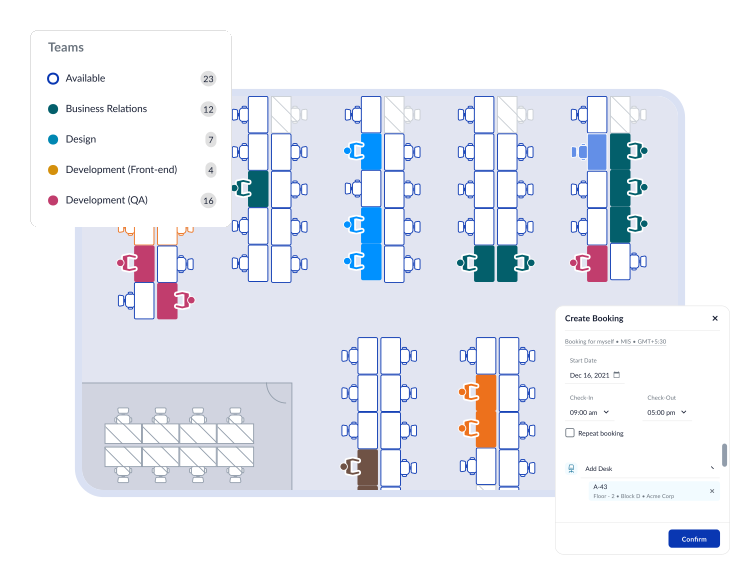
Hot desk booking software is designed to help you reserve workspaces easily. You can use it to book desks and meeting rooms based on your needs.
With a desk reservation system, each desk is marked as bookable. You can see which spaces are open and easily select one. This system uses a first-come, first-served model, so you need to book quickly to secure your preferred spot.
Many systems offer a simple online interface. You log in, view available desks, and choose one based on your schedule. You may also filter by location, amenities, or time slots to find what suits you best.
Additionally, some desk booking systems allow for real-time updates. If a desk becomes available, you can see it immediately. This feature helps you adjust your plans on the fly.
These systems often integrate with your calendar. This means you can sync your bookings with your work schedule. You’ll receive reminders before your reservation begins.
Smart office technology is another part of these systems. It can monitor the usage of desks and meeting rooms. This data helps your company manage space efficiently and can lead to better workplace flexibility.
Using hot desk booking software can lead to a more organized and productive hybrid work environment. With efficient reservation tools, you can focus more on your work and less on finding a place to sit.
Hot desking offers several advantages for your workplace environment. Here are some key benefits:
Cost Savings: By allowing shared use of office space, you can reduce real estate costs. This arrangement makes better use of available square footage.
Flexible Work Environments: Hot desking supports flexible work practices. Employees can choose workspaces that suit their tasks, promoting a personalized work experience.
Increased Collaboration: Shared spaces encourage cross-functional interactions. You can boost teamwork and innovation by allowing employees from different departments to work together.
Enhanced Employee Satisfaction: A dynamic workspace can increase engagement. Employees often feel more motivated when they have the freedom to choose where they work.
Improved Company Culture: A flexible work setup fosters inclusivity. Coworking spaces can strengthen relationships and support a collaborative company culture.
Boosted Productivity: Access to various work environments can heighten focus. Employees can select quieter areas for concentration or vibrant spaces for teamwork.
Hot desking is a strategic approach suited for modern workplaces. It can transform your office into a more efficient and enjoyable environment.
Hot desking has some drawbacks that you should consider before implementation.
Potential for Disruption: With many employees sharing desks, you may experience constant movement. This can make it hard to focus on your work.
Loss of Structure: Working in a flexible environment can sometimes lead to a loss of hierarchy. You might find it challenging to navigate team dynamics.
Decreased Sense of Belonging: Without a reserved desk, some employees may feel less connected to their workspace. This could impact teamwork and morale.
Space Utilization Issues: While hot desking aims to improve space efficiency, it can sometimes lead to underutilized areas. Not everyone may find the right place to work comfortably.
Before adopting a hot desking policy, weigh these pros and cons of hot desking. Consider how these factors will affect you and your colleagues in your workplace.

To tackle the challenges of hot desking, focus on effective space optimization. Create a variety of work areas that suit different work styles. For example, provide collaborative spaces, quiet zones, and areas for focused work.
Utilize smart office technology to streamline the workspace system. Implement a desk booking system that allows employees to reserve desks in advance. This reduces confusion and ensures adequate space for everyone.
Office design should promote flexibility. Use modular furniture that can be easily rearranged. This allows for quick adjustments based on team needs or specific projects.
Provide guidelines and a clear hot desking policy. Inform employees about proper desk etiquette, cleaning protocols, and how to effectively share spaces. This creates a respectful environment and encourages everyone to take responsibility for their workspace.
Train your team in hybrid workplace management. Offer workshops or resources that help staff adapt to shared environments. This can improve communication and make transitions smoother.
Listen to feedback from your employees. Understand their concerns about the workspace arrangement so you can make necessary changes. Creating an open dialogue fosters a culture of collaboration and helps address issues quickly.
By taking these steps, you can enhance the effectiveness of hot desking and support a productive work environment.
To successfully implement hot desking, start by designing flexible workspaces. Create office neighborhoods where teams can collaborate easily.
Use a desk booking system to help employees reserve their workspace in advance. This reduces confusion and ensures availability.
Make sure to provide necessary amenities. Equip shared office spaces with power outlets, ergonomic chairs, and docking stations. These features enhance comfort and productivity.
Communicate clearly about your hot desking policy. Ensure employees understand the rules and benefits. Transparency helps reduce resistance to change.
Encourage an activity-based working approach, allowing workers to choose spaces based on their tasks. This promotes efficiency and can boost employee morale.
Train your staff on using smart office technology. Familiarity with tools can lead to smoother operations and better overall experiences.
Integrate feedback channels. Collect input from employees to adjust layouts and practices. This fosters a sense of ownership and improves the hot desking model.
Be mindful of the challenges. Prepare for potential issues, such as noise or lack of privacy. Implement solutions, like quiet zones or soundproofing.
Lastly, promote community in a hybrid workplace. Organize regular team-building events to maintain connections among remote and in-office employees. This supports a strong, cohesive culture despite varying work models.
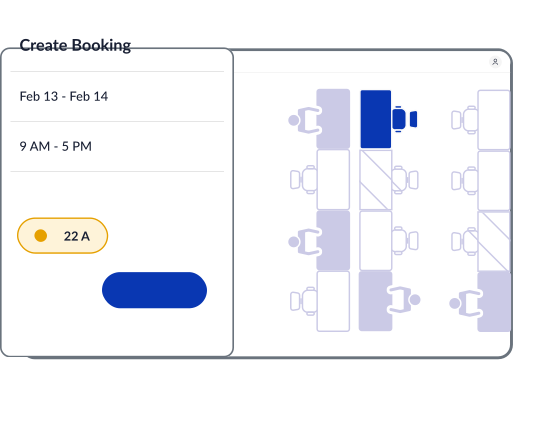
WorkInSync offers an easy solution for hot desking in a flexible workspace. It makes managing desks straightforward.
You can:
Book desks in advance to secure your space.
See real-time availability of desks throughout the office.
Adapt quickly to changes in workspace needs.
The platform enhances workplace efficiency by allowing teams to easily collaborate without the hassle of finding a desk. You can access a list of available desks and choose one that suits your needs.
Using WorkInSync helps you adapt to the hybrid work model. Whether you are remote or onsite, you can find the right desk when you need it. This flexibility supports both employee productivity and team dynamics.
Additionally, WorkInSync provides insights into your office usage patterns. This data helps optimize your office space management and improve your hot desking strategy.
Key Benefits of WorkInSync for Hot Desking:
Easy desk booking
Increased flexibility
Enhanced productivity
Efficient space management
By using WorkInSync’s smart office technology, you can create a productive hybrid work environment. Embrace shared office spaces and enjoy a workplace tailored to your needs.
 Workplace Management
24 September 2026
Compare six workplace management platforms. See what each is suited for and how to choose the right fit in 2026.
Deesha
|
4 Min Read
Read More
 Announcement
13 August 2026
WorkInSync has been recognized by Info-Tech Research Group as a Champion in the 2026 Data Quadrant for Space Management, ranking #2, and as a Champion in the Emotional Footprint, ranking #2. Both awards are published on SoftwareReviews, Info-Tech's ratings platform, where rankings are built entirely from user feedback.

Sai Riddi
|
2 Min Read
Read More
 Desk Booking Software
5 June 2026
Let’s not pretend otherwise. Somewhere in your organization, a well-meaning IT or facilities team rolled out a desk booking system. There was a demo. Someone said “seamless.” There may have been a slide with the word “frictionless” on it. Leadership nodded. Procurement signed off. And then employees quietly went back to texting each other on […]

Ujjwal Trivedi
|
6 Min Read
Read More